Mastering Your Schedule: The Ultimate Guide to Vis...
14 May, 2026

by admin
| 21 Apr' 2025
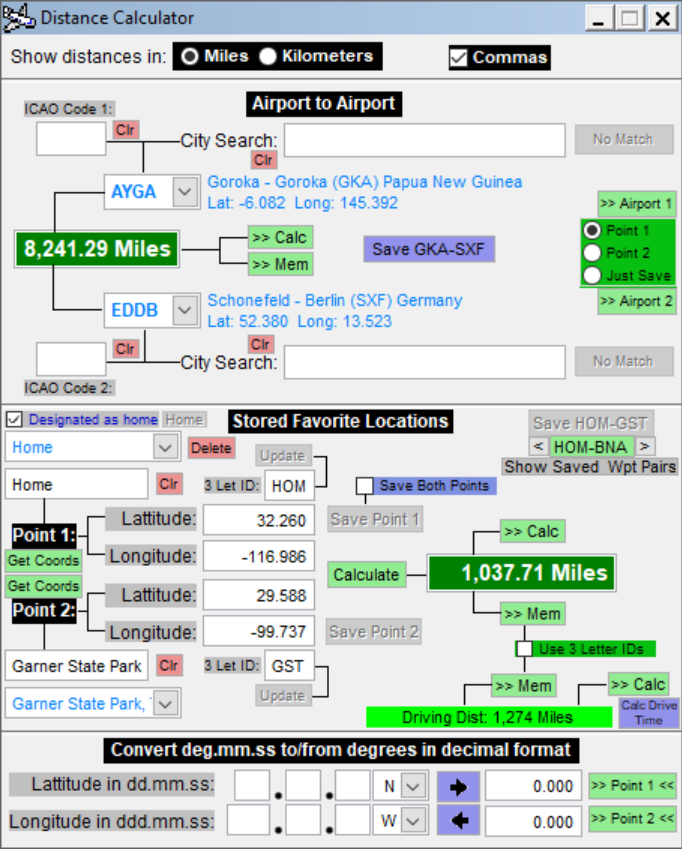
The SoftmicaCalc Distance Calculator has great versatility. You can add any location you desire and instantly get the air and exact driving distance between any two stored locations. When you add a location you press [Get Coords] to get the coordinates for the location you entered. For example, if you enter "Garner State Park" as your location, when you press [Get Coords], the Distance Calc will query google maps to get the exact lat/long coordinates for Garner State Park in Texas and return the results in the lat/long boxes. After entering a unique three-letter identifer, you can save this location and use it as needed to find the distance between this and any other saved location. Even if you don't save it, you will still see the caculated distances between this location and the location selected in the other waypoint.
There is also a new button to calculate the driving time based upon the driving distance.